
iWeb Tip #17 – Page Titles in iWeb
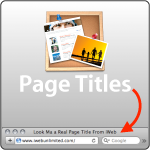
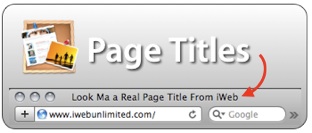 You’ll notice that when you visit a webpage at the top of your browser there is a title of the page. In iWeb you get this title by the header text box and if you delete that it just uses the name of the page in the sidebar. Search engines do a lot better finding your page if you have a good title for your page so here are some tips to help get your page to have a title.
So the first thing is that when you add a new page to your site in iWeb there is always a title box, even when you choose the blank template page. Many people delete this text box when they are making a custom design, but don’t do it! Try to make it so everypage has this text box on the page.
The problem lyes in that the text box can’t leave the header part of your page, so it almost forces you to use that textbox in your design. But what if you don’t want to use that text box cause you want a lot of words to be part of your page title (meaning the part that will show in the browser top like this image)

But you don’t want it to be on the actual page.
So what you can do is put this text box really small at the top of the page and give it a good title and change the color to be the same as the background. You do that by using the little magnifying glass on the color picker and click on the background. That way you’ll be sure to get the right color. By doing this it will help you to have a good title for your page and it’s not seen. And this way you can make your own design without being forced to really use that box in the design (if that makes sense). Here’s an image to show it better:
 Sometimes you have an object, and image, or possibly a flash object in the header of your page you can just use the arrange menu on the menu bar and send it to the back (or press command + shift + B). That way it’s not seen but you can still have a good title. Notice my image below. I turned on “Show Layout” by pressing Command + Shift + L and you can see that I sent the text box behind the top image. That way it won’t be seen but I can have a long title, that will fully describe my page and help my web searchability out.

The blog and podcast templates in iWeb let you move the title text box out of the header into the content area by holding down the command key as you drag it. It only works on the main and archive pages. The entry pages have to stay in the header.
So the main point of this tip is to leave the head text box on your page and either use it in your design, or type whatever title you want for each page (suggested) and hide it on your page so it won’t be seen, but will be used.
Note: If you forgot about this tip and already deleted that box, no you can’t get it back. You can do one of two things. Create a new page re-design and copy and paste stuff over to it, or you can publish your page(s) and open the html files in an html editor (like Coda, Espresso, Text Edit) and find the title tag and put in your own title. It looks like this <title>This is My Page Title</tite>
Another Note: I’ve had some readers scare other readers by listing that this will get your site black listed on sites like Google and Yahoo. The terms says it will be banned only if “your site is perceived to contain hidden text and links that are deceptive in intent”, this method is not deceptive in intent as it only adds text to the title of the site. So this will not hurt your site in the search engine, it will only help it.
Hope this tips helps.














The issue that I find with this is since I use background and textures for my sites, that i can’t do it via this method. Another quick method I found is to change the html page in your iDisk directly, and change Home to something different like SeaLight Entertainment – Home or really anything!
BUT I did use this for another site I worked on and it worked out perfectly! (http://www.ActionFilmWorkshops.com)
Thanks Jason!
Hi Jason,
This doesn’t seem to be working for me. I’m testing this out on a page I designed from scratch. I’ve created a text box, which I’ve placed in the upper right corner of the page. Text matches the page’s background color to hide it, but the page name isn’t displaying what I’ve typed. Have I missed something?
Yes you are missing something. You can’t just place a text box. If you read my tip carefully it talks about the default text box that comes on the page. Use that as your page title. If you deleted it you’ll have to create a new page, and copy and paste you stuff onto that page. Point being that you have to use the text box that is already there when you choose a template.
I have found that if you change themes a new title page comes up. Then you can go back to your own theme with the title there. It worked for me anyhow.
Love the site.
I just tried this AFTER I built most of the site. It screwed up all the fonts and text placements. Luckily, I could revert. Did I miss something?
I meant title text box.
Sweet!! Love this tip! Can you put a logo before the text some how? that would make this tip AWESOME!!
I’ve thought of using this technique in place of meta tags since we can’t add those in iweb, but that runs into the “secret text” problem probably. Maybe people who use iweb should be exempt from the secret text rule since we have no other way of adding titles and meta tags!
By the by, since I (and many other people I’m sure!) are stumped on meta tags, I’d love an iweb tip on how to add them! :)
Me too! If there is any way to add meta tags to the iWeb website directly, I would *LOVE* it!. I’m currently using the iWeb SEO tool. I think it works, cut it’s clunky at best.
iwebSEO TOOL (meta Tags for iWeb) It’s FREE Good Luck!
http://www.ragesw.com/products/iweb-seo-tool/download/
It works. I now have decent page titles on all my pages. Any idea how to get google to find my other pages using these titles? I’ve tried every search that I can think of to get one of my page titles (not the welcome page) to show up on it’s own in a search. Any ideas??
I found that this worked if I used a template page. But it did not work with a Blank page. Even though there is a pre-made Title Box on the Blank page it used the side bare title on the web. If I used a pre-made template for example “Photos” I changed the title in the title box and it showed up like you said on the web. Nice tip. It is easy to take a Template page and erase all the things on it except the title box and go from there. Well worth the trouble.
I have to amend my first comment. Place holder pictures cannot be deleted off of the Photos Page, So that page will not work. I tried the “Welcome Page” and that worked fine. You can erase everything on that page and save the Title box and it will work like the tip says.
Thank you for this website. During the development of my own site I have definitely referred back here on many occasions!!
Question, I am trying to find out for sure if using accents will have a negative impact?? If my company name is ZízImages (note the accented i), will this equally be found in search engines if someone looks for “ZizImages”? Or should I change all my titles to the unaccented “i” for better resutls?
I have trawled around the internet and have found that the following in a html snippet does the trick
parent.document.title=”Your Title”
Sorry it didn’t print the entire text. Just remove the at the end.
<!– parent.document.title=”The testing zone…” ‘–>
Ah Harry, you’re on the right track, but that won’t do it alone. You need to put the code inside javascript brackets. I just tested it out and it works great. Good find, I’ll have to update this post with this tip. For now, here’s the tip code. Just put this in an HTML Snippet and it will do the job.
<script type="text/javascript">parent.document.title="Add Your Title Here"</script>
Any more info on this method? I’ve taken the javascript and put it in an HTML Snippet… it works great when I open the HTML page via my hard drive. But once the file is uploaded and I go to my website there is a little window with my WebHost Companies name in it. Any ideas?
Ok. So I am trying to do this, but can’t work out how to change the colour of the text. Can’t find an option in the inspector. I can find it for a normal text box. But not the title text box. Am I missing something. Aaron.
You must double click the text box that’s found on a page upon first adding the page, then go to the text inspector you’ll find a little square color box that you click which will open up the color picker. Then just choose the same color as your background.
I changed the title in the html file using coda, but everytime I re-sync the site it copies over the html file and I have to do it again. any thioughts? I also have the same issue with the image slider. I place it and everything works fine, but every time I publish the site it erases the image slider folder that I uploaded to my directory.
Hey,
so what if i deleted that text box already? Anyway to bring it back?
thanks.
Hi,
thanks for the tip!
A suggestion I did not see: you can make the color of the background and the text opaque by setting the opacity slider to 0%: in that case you can put the box just anywhere and it will not be visible, regardless of a background color or image.
BTW: tried to copy the text box between pages, but that doesn’t seem to work; will now try the HTML snippet.
cheers,
Lodewijk
Hi are you saying that if I put this code in an html snippet on each page in iWeb I can put whatever title I want?
parent.document.title=”Add Your Title Here”
thanks – not so becky but determined to build a nice site using iWeb
I meant to say “your above mentioned html code not what I pasted (smiles)
I am creating a new website with iweb. I am unsure of the difference between the page header and page title. Can you explain? Is the header where you want to follow the above suggestion and the title page where I would put something simple like locations? Thanks.
I am having trouble reading your tips. Every page on your site has the facebook/tweet/etc. vertical bar blocking the text of the tip. I am using the latest version of Chrome browser on a Mac. Thanks.
If you have a multicolored background, changing the font SIZE to 1 will work, as changing the color will not. Just another tip from someone stuck still using iWeb…