EverWeb 4.5 Preview: One of the Biggest EverWeb Releases Yet

EverWeb 4.5 is almost here, and it is shaping up to be one of the biggest updates in EverWeb’s history.
While every major release brings new features and improvements, EverWeb 4.5 introduces entirely new ways to build interactive, responsive, and visually engaging websites without writing code. From popup windows and interactive click actions to responsive carousels, object pinning, visual effects, SVG masking, and major performance improvements, this release expands what is possible inside EverWeb more than any update in recent years.
Whether you build business websites, portfolios, blogs, membership sites, online stores, or landing pages, EverWeb 4.5 includes new tools that will make your websites more dynamic while simplifying many design workflows.
Major Improvements for Responsive Design
Responsive website design receives some of the largest improvements in EverWeb 4.5.
The headline feature is Object Pinning, which allows objects to remain positioned relative to browser edges or Container edges as the page resizes. This new feature essentially allows you to place objects anywhere on a responsive page layout, just like you would on a fixed with page. As a page is resized, objects move relative to the specified edge.
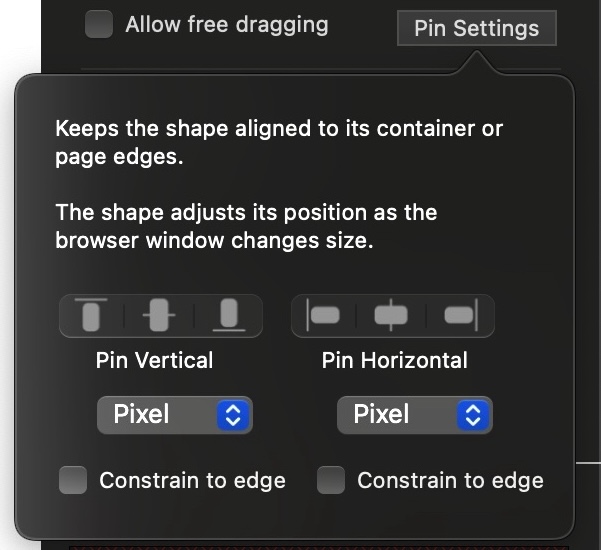
EverWeb Object Pinning for Responsive Design
Just select any object and assign a vertical or horizontal pin. The object will stay positioned relative to its parent edge, either the browser page or its container. You can set pixel based or percentage based pinning.
More Interactive Websites Without Coding
One of the major themes of EverWeb 4.5 is interactivity.
The new Mouse Click Actions feature allows any object on your page to perform actions when clicked. Buttons, images, text, shapes, and other objects can now:
– Show, hide, or toggle content
– Open and close popup windows
– Control videos
– Navigate Carousel widgets
– Scroll content into view
– Move and resize objects
– Display messages
– Trigger multiple actions in sequence
Combined with the new Popup Windows feature mentioned below, this opens the door to creating modern website interactions that previously required custom JavaScript or third-party solutions.
You can now create FAQ sections, expandable content areas, interactive product displays, pricing popups, video overlays, newsletter signup forms, promotional offers, and much more directly inside EverWeb.
Powerful New Popup Windows
Popup Windows are one of the most anticipated additions in EverWeb 4.5.
EverWeb Popup Windows are designed visually using the same workflow you already use throughout the application. You can set custom triggers for popup windows so they appear on page load, after a specified time delay, at a certain scroll position or even when an object is clicked. Additionally EverWeb’s Popup Windows can be shown when your visitors are about to leave your site, giving you the opportunity to catch their attention one last time.
You can position popups anywhere on the screen, customize overlays, prevent repeated displays using cookies, lock page scrolling, and even apply SVG masks and animations.
SVG Masks are a new feature that let you assign a shape mask to any element on your page and these work great for Popup Windows since you can create creative window shapes
For marketers, businesses, and membership sites, Popup Windows provide an entirely new way to engage visitors and increase conversions.
A New Carousel Widget
EverWeb 4.5 also introduces an all-new Carousel Widget which let you slide content horizontally across your page. They work great on desktop and mobile devices by letting you introduce automatic or manually scrolled content that aligns horizontally.
Each carousel slide can contain virtually any content that EverWeb supports, including text, images, videos, forms, widgets, containers, and other design elements. Carousels work just like a container, just with extra functions like automatic scrolling.

The Carousel Widget supports:
– Auto-play
– Swipe navigation
– Pagination controls
– Custom navigation buttons
– Looping
– Responsive design
This makes it ideal for testimonials, portfolios, product showcases, service highlights, pricing plans, team members, and much more.
New Visual Design Tools
Designers will also find a large collection of new visual enhancements.
EverWeb 4.5 introduces SVG masking support, allowing shapes and popup windows to use custom mask designs. A built-in SVG mask library is included, and masks can be rotated directly from the mask picker. In addition to SVG masks, EverWeb 4.5 lets you add gradient masks to any shape, letting you create awesome, modern effects in your page design.
Additionally, new visual effects can now be applied directly to page objects including;
– Blur
– Brightness
– Contrast
– Saturation
– Hue
– Sepia
– Invert
– Grayscale
The result is greater creative flexibility without requiring image editing software.
Better Image Handling
The new Focus Area Editor allows you to define the most important part of an image when using Scale to Fill. The selected area remains visible across responsive breakpoints, helping ensure that key content is never accidentally cropped. Your images are automatically optimized for all devices, increasing page load speed and providing more control over your web page hero images.
EverWeb can also now export multiple image sizes for responsive websites automatically, further improving web page loading performance on smaller devices.
Improved Custom Code Support
For users who embed custom code, EverWeb 4.5 introduces isolated iframe support for HTML Code widgets.
This prevents custom HTML, CSS, and JavaScript from affecting the rest of your page while still allowing advanced integrations and embedded applications. You can now embed any type of code in your EverWeb web page and it won’t affect other parts of your page. If you still need direct embedding of code onto a page, EverWeb’s HTML Snippet still offers this functionality.
The HTML Snippet also adds automatic height adjustment so your snippets can properly resize on responsive page layouts.
Faster Performance Across the Board
EverWeb 4.5 includes extensive optimization work behind the scenes.
Some of the improvements include:
– Faster Container resizing
– Faster page switching
– Faster object loading
– Faster image rendering
– Faster project saving
– Improved browser preview performance
– Better handling of large projects
– Improved responsive layout calculations
These optimizations help make website design smoother and more responsive, particularly for larger projects.
Hundreds of Improvements and Fixes
Beyond the major new features, EverWeb 4.5 includes a large number of improvements and bug fixes across nearly every area of the application.
Blogging, publishing, Containers, Responsive Rows, widgets, image handling, Google Fonts, contact forms, membership sites, project management, localization, and Windows compatibility all receive enhancements in this release.
In total, EverWeb 4.5 represents one of the largest feature and maintenance updates the platform has ever received.
EverWeb 4.5 Is Coming Soon
EverWeb 4.5 will be available soon for both macOS and Windows. The public beta is currently available for registered users.






Leave a reply